



Keyword research used to mean hours buried in spreadsheets, cross-referencing search volumes, and squinting at competitor pages. Claude AI doesn’t replace your SEO tools, but it can collapse a lot of that grind into minutes and, more importantly, help you think better about strategy.
This is a practical, step-by-step guide to using Claude across your SEO workflow: from finding keyword ideas and grouping them into clusters, to building content briefs and FAQ sections that actually rank. Every step includes a copy-paste prompt you can use today.
New to Claude? If you’re not sure what Claude AI is or how it compares to ChatGPT, start with our hub post: What is Claude AI? A Digital Marketer’s First Look. Then come back here for the SEO playbook
First, a Reality Check: What Claude Can and Can't Do for SEO
Let’s set expectations so you use the right tool for each job.
Claude is excellent at:
- Expanding seed keywords into hundreds of related terms and questions
- Grouping messy keyword lists into logical clusters and topics
- Mapping keywords to search intent (informational, commercial, transactional)
- Building content outlines and briefs from a target keyword
- Writing meta titles, descriptions, and FAQ blocks at scale
Claude is not a replacement for:
- Search volume and difficulty data — you still need a tool like Ahrefs, Semrush, or even Google Keyword Planner for the hard numbers.
- Live SERP analysis — verify what’s actually ranking before you commit.
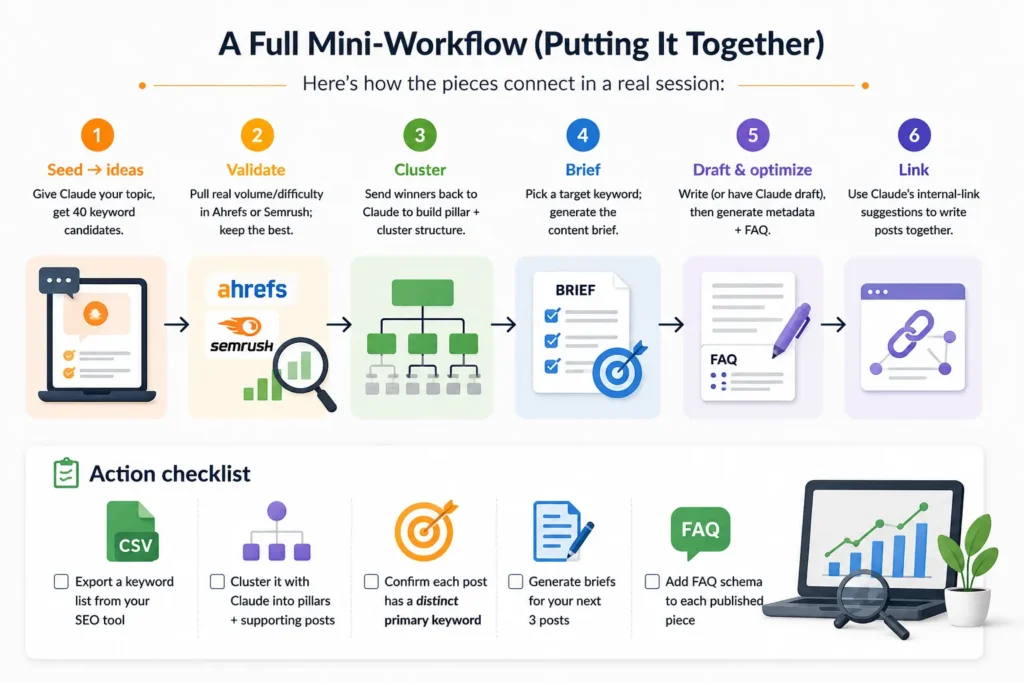
The winning workflow: Use your SEO tool for the data (volume, difficulty, what ranks). Use Claude for the thinking (ideas, clustering, intent, briefs, copy). Together they’re far faster than either alone.
A note on Claude’s research ability: Claude’s standard knowledge has a cutoff date, so for the freshest search trends, use a version with web access or paste in your own tool’s export. The deep-research style workflows below assume you’re feeding Claude real data, not relying on it to know current volumes.
Step 1: Generate Keyword Ideas From a Seed Topic
Start broad. Give Claude your topic and let it expand outward into the terms real people search.
Prompt:
“I run a blog about [your niche]. My seed topic is ‘[seed keyword]’. Generate 40 related keyword ideas. Group them by search intent: informational, commercial, and transactional. For each, note the likely intent in one phrase.”
Claude will hand you a structured list far faster than manual brainstorming. Take that list into your SEO tool to pull real volume and difficulty, then bring the winners back to Claude for the next step.
Step 2: Map Keywords to Search Intent
Targeting the wrong intent is the most common reason content fails to rank. A buyer-intent keyword needs a comparison or product page, not a 101 guide.
Prompt:
“Here is a list of keywords: [paste list]. For each one, classify the search intent (informational, commercial investigation, or transactional), and suggest the best content format to target it (e.g. how-to guide, listicle, comparison, product page).”
This single step stops you from writing a beginner explainer for a keyword where searchers actually want to buy.
Step 3: Build Keyword Clusters (The SEO Power Move)
This is where Claude earns its place in your workflow. Instead of targeting one keyword per post, you group related terms into clusters built around a pillar topic, the foundation of topical authority.
Prompt:
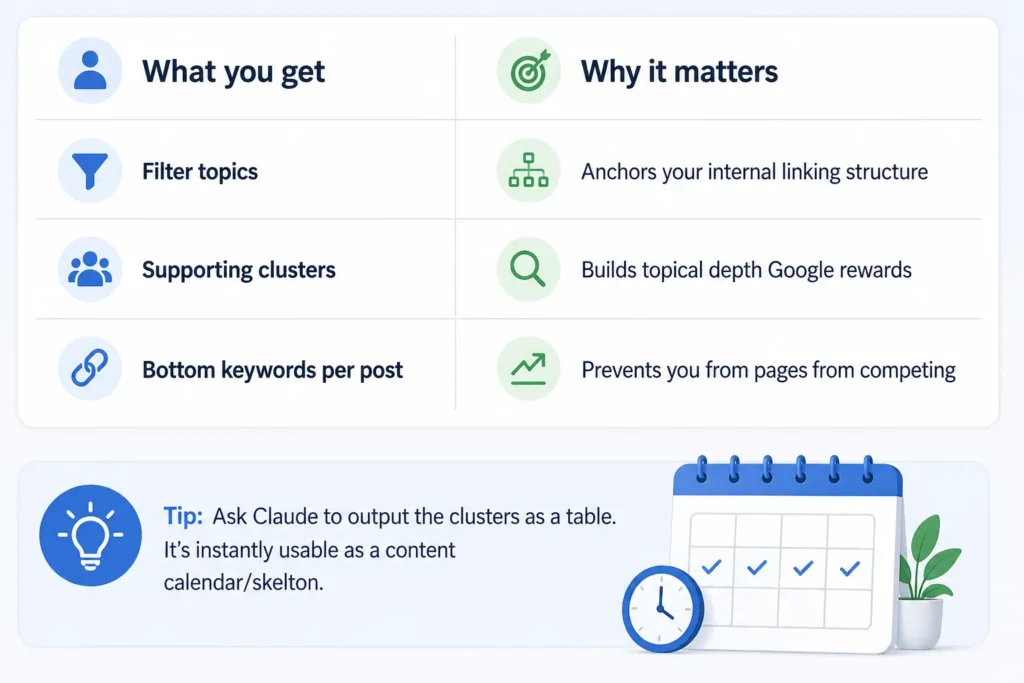
“Take this keyword list: [paste list]. Group them into 5–8 content clusters. For each cluster, give it a pillar topic, list the supporting keywords, and suggest one pillar-page title plus 3–5 supporting blog post titles. Make sure each post targets a distinct primary keyword to avoid keyword cannibalization.”
Tip: Ask Claude to output the clusters as a table. It’s instantly usable as a content-calendar skeleton.
Step 4: Turn a Keyword Into a Content Brief
Once you’ve picked a target keyword, Claude can build the brief, the outline, the angle, the questions to answer.
Prompt:
“Create an SEO content brief for the keyword ‘[target keyword]’. Include: a recommended title, search intent, a suggested word count, an H2/H3 heading outline, key questions to answer, related keywords to include naturally, and 3 internal link suggestions I should add.”
You’ll get a writer-ready brief in seconds. Hand it to a freelancer, or use it as your own writing roadmap.
Step 5: Write Metadata and FAQ Sections at Scale
The unglamorous, time-consuming SEO tasks are where AI saves the most hours.
Prompt for metadata:
“Write an SEO title (under 60 characters) and meta description (under 155 characters) for a blog post targeting ‘[keyword]’. Make the description benefit-driven with a soft call to action.”
Prompt for FAQ schema content:
“Generate 5 FAQ questions and concise answers (2–3 sentences each) for a blog post about ‘[topic]’. Base the questions on what people actually search. Keep answers factual and skimmable.”
Drop those answers into an FAQ schema block and you’ve added structured data that can earn rich results in a couple of minutes.
Common Mistakes to Avoid
- Trusting AI for search volume. Claude estimates; it doesn’t measure. Always validate with real data.
- Letting clusters cannibalize. Two posts targeting the same keyword compete with each other. Keep primaries distinct.
- Publishing unedited briefs as posts. A brief is a starting point, not a finished article.
- Skipping the SERP check. Before writing, glance at what’s actually ranking — it reveals the format Google rewards.
The Bottom Line
Claude won’t replace Ahrefs or Semrush, and it shouldn’t. But as the thinking layer on top of your data — expanding ideas, clustering topics, mapping intent, and producing briefs and metadata — it can cut your SEO workflow from hours to minutes while making your strategy sharper.
Pair it with real keyword data, keep a human in the loop for judgment, and you’ve got a genuinely fast, repeatable SEO engine.